String Compare Node
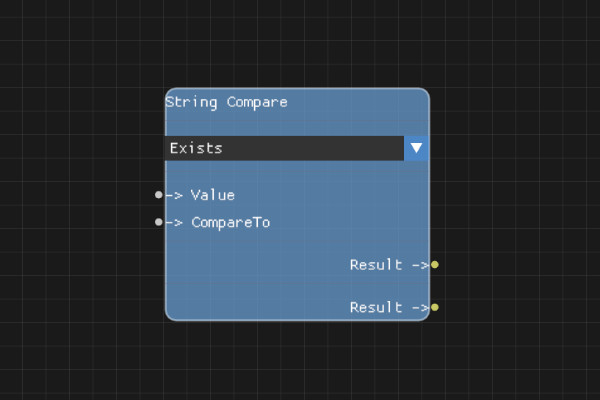
The String Compare node compares two string values using various comparison modes.
Description
The String Compare node performs string comparisons using different modes such as equals, contains, starts with, ends with, or regex matching. The result is a boolean value that can be used with Branch nodes for conditional logic.
Execution Inputs
None (data node, no execution flow)
Variable Inputs
- Value (string): The first string to compare
- CompareTo (string): The second string to compare against (used in comparison modes that require two values)
- ComparisonMode (string, property): The comparison mode to use:
- "exists" / "does_not_exist"
- "is_empty" / "is_not_empty"
- "is_equal_to" / "is_not_equal_to"
- "contains" / "does_not_contain"
- "starts_with" / "does_not_start_with"
- "ends_with" / "does_not_end_with"
- "matches_regex" / "does_not_match_regex"
Execution Outputs
None (data node, no execution flow)
Variable Outputs
- Result (boolean):
trueif the comparison succeeds,falseotherwise
Special Notes
- Comparison modes are set in the node properties, not as an input pin
- Some modes (like "exists", "is_empty") only use the Value input
- Other modes (like "is_equal_to", "contains") use both Value and CompareTo inputs
- Regex patterns must be valid - invalid patterns will log a warning and return false
- Comparisons are case-sensitive
- Empty strings are considered empty for "is_empty" checks
Example Usage
Check if a user input equals "admin" to route to admin-specific logic, or check if an email contains "@" to validate email format. Connect the Result output to a Branch node's Condition input for conditional execution.
Flow Download Example
Placeholder for flow download example
Additional Pictures
Placeholder for additional node images and examples