Create Speech Node
The Create Speech node converts text to speech audio using OpenAI's TTS (text-to-speech) models.
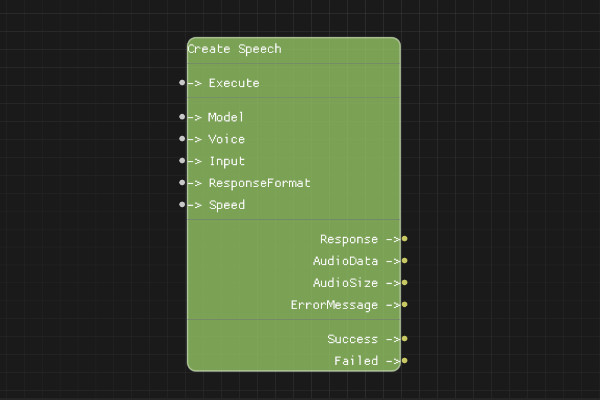
Description
The Create Speech node generates audio from text using OpenAI's text-to-speech models. It supports multiple voices and output formats.
Execution Inputs
- Execute (execution): Triggers the speech generation request
Variable Inputs
- Model (string): The TTS model to use. Must be "tts-1" or "tts-1-hd" (default: "tts-1")
- Voice (string): The voice to use. Must be one of: "alloy", "echo", "fable", "onyx", "nova", "shimmer" (default: "alloy")
- Input (string): The text to convert to speech
- ResponseFormat (string, optional): Audio format. Must be "mp3", "opus", "aac", or "flac" (default: "mp3")
- Speed (float, optional): Speed of the generated speech. Must be between 0.25 and 4.0 (default: 1.0)
Execution Outputs
- Success (execution): Execution continues here if the request succeeded
- Failed (execution): Execution continues here if the request failed
Variable Outputs
- Response (string): Full JSON response from the API
- AudioData (string): Base64-encoded audio data
- AudioSize (integer): Size of the audio data in bytes
- ErrorMessage (string): Error message if request failed
Special Notes
- Requires a valid API key configured via Set API Key node
- Maximum input text length is 4096 characters
- Audio data is returned as base64-encoded string
- Use Save Speech To File node to save the audio to disk
- "tts-1-hd" provides higher quality but is slower
- Speed values below 1.0 slow down speech, above 1.0 speed it up
Example Usage
Generate speech from text:
- Set Model to "tts-1"
- Set Voice to "nova"
- Set Input to "Hello, this is a test of text-to-speech."
- Set ResponseFormat to "mp3"
- Connect Execute to generate
- Use AudioData output with Save Speech To File node to save
Flow Download Example
Placeholder for flow download example
Additional Pictures
Placeholder for additional node images and examples