Create Translation Node
The Create Translation node translates audio files to English text using OpenAI's Whisper model.
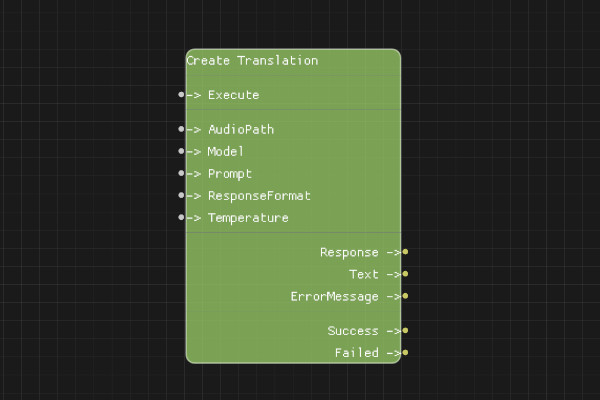
Description
The Create Translation node translates speech in an audio file to English text using OpenAI's Whisper model. Unlike transcription, this always translates to English regardless of the source language.
Execution Inputs
- Execute (execution): Triggers the translation request
Variable Inputs
- AudioPath (string): Path to the audio file to translate
- Model (string, optional): Model to use. Must be "whisper-1" (default: "whisper-1")
- Prompt (string, optional): Optional text prompt to guide the translation
- ResponseFormat (string, optional): Format of the response. Must be "json", "text", "srt", "verbose_json", or "vtt" (default: "json")
- Temperature (float, optional): Sampling temperature between 0 and 1 (default: 0)
Execution Outputs
- Success (execution): Execution continues here if the request succeeded
- Failed (execution): Execution continues here if the request failed
Variable Outputs
- Response (string): Full JSON response from the API
- Text (string): The translated English text
- ErrorMessage (string): Error message if request failed
Special Notes
- Requires a valid API key configured via Set API Key node
- Audio file must be in a supported format (mp3, mp4, mpeg, mpga, m4a, wav, webm)
- Maximum file size is 25MB
- Translation always outputs English text, regardless of source language
- The Prompt can help with proper nouns, technical terms, or context
- ResponseFormat "text" returns plain text, "json" returns structured data
Example Usage
Translate an audio file to English:
- Set AudioPath to "audio/spanish_speech.mp3"
- Set Model to "whisper-1"
- Set ResponseFormat to "text"
- Connect Execute to translate
- Use Text output to get the English translation
Flow Download Example
Placeholder for flow download example
Additional Pictures
Placeholder for additional node images and examples