Create Chat Completion Node
The Create Chat Completion node generates a chat completion using OpenAI's chat models (like GPT-3.5-turbo or GPT-4).
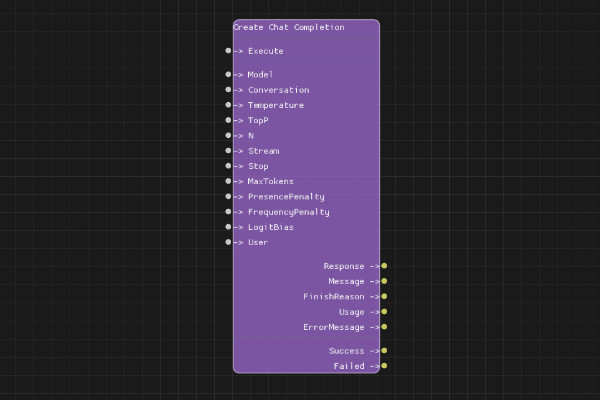
Description
The Create Chat Completion node sends a chat completion request to OpenAI's API. It uses a conversation ID to maintain context across multiple messages. The node supports all standard chat completion parameters including temperature, top-p, max tokens, and more.
Execution Inputs
- Execute (execution): Triggers the chat completion request
Variable Inputs
- Model (string): The model to use (e.g., "gpt-3.5-turbo", "gpt-4"). Default: "gpt-3.5-turbo"
- Conversation (string): The conversation ID from Create Conversation node
- Temperature (float, optional): Sampling temperature between 0 and 2. Higher values make output more random
- TopP (float, optional): Nucleus sampling parameter. Alternative to temperature
- N (integer, optional): Number of completions to generate
- Stream (boolean, optional): Whether to stream the response
- Stop (string, optional): Stop sequences (comma-separated)
- MaxTokens (integer, optional): Maximum tokens to generate
- PresencePenalty (float, optional): Penalty for token presence (-2.0 to 2.0)
- FrequencyPenalty (float, optional): Penalty for token frequency (-2.0 to 2.0)
- LogitBias (string, optional): JSON object mapping token IDs to bias values
- User (string, optional): User identifier for tracking
Execution Outputs
- Success (execution): Execution continues here if the request succeeded
- Failed (execution): Execution continues here if the request failed
Variable Outputs
- Response (string): Full JSON response from the API
- Message (string): The assistant's message content
- FinishReason (string): Reason for completion (e.g., "stop", "length")
- Usage (string): Token usage information as JSON
- ErrorMessage (string): Error message if request failed
Special Notes
- Requires a valid API key configured via Set API Key node
- The Conversation input must be a valid conversation ID from Create Conversation node
- Temperature and TopP should not both be set (use one or the other)
- MaxTokens must be within the model's limits
- The node automatically handles conversation context and message history
Example Usage
Create a simple chat completion:
- Use Create Conversation node to get a conversation ID
- Use Add User Message node to add your message
- Connect Conversation output to this node's Conversation input
- Set Model to "gpt-3.5-turbo"
- Connect Execute to start the request
- Use Message output to get the assistant's response
Flow Download Example
Placeholder for flow download example
Additional Pictures
Placeholder for additional node images and examples