Set System Message Node
The Set System Message node sets or updates the system message for a conversation. The system message defines the AI's behavior and role.
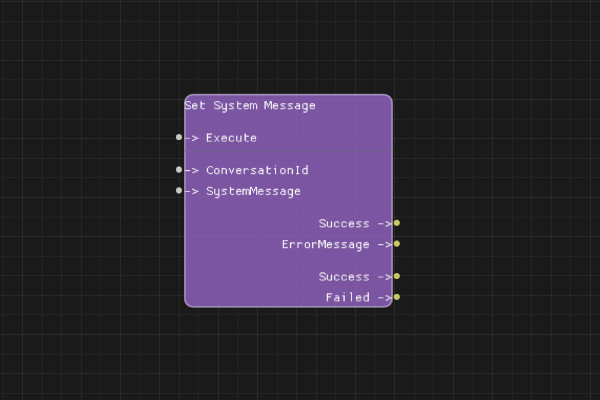
Description
The Set System Message node configures the system message for a conversation. The system message acts as instructions to the AI model, defining its role, behavior, and constraints.
You can set a system message when creating a conversation or update it later using this node.
Execution Inputs
- Execute (execution): Triggers setting the system message
Variable Inputs
- ConversationId (string): The conversation ID from Create Conversation node
- SystemMessage (string): The system message content
Execution Outputs
- Success (execution): Execution continues here if system message was successfully set
- Failed (execution): Execution continues here if setting the message failed
Variable Outputs
- Success (boolean): "true" if system message was successfully set, "false" otherwise
- ErrorMessage (string): Error message if operation failed
Special Notes
- The conversation must exist (created via Create Conversation node)
- System messages define the AI's behavior and role
- Maximum system message size is 1MB
- Setting a new system message replaces any existing system message
- System messages are included in every chat completion request
Example Usage
Set a system message for a coding assistant:
- Connect ConversationId from Create Conversation node
- Set SystemMessage to "You are a helpful coding assistant. Always provide code examples and explanations."
- Connect Execute to set the message
- Connect Success output to continue the flow
Flow Download Example
Placeholder for flow download example
Additional Pictures
Placeholder for additional node images and examples