Add User Message Node
The Add User Message node adds a user message to an existing conversation. This message will be included in the conversation history for future completions.
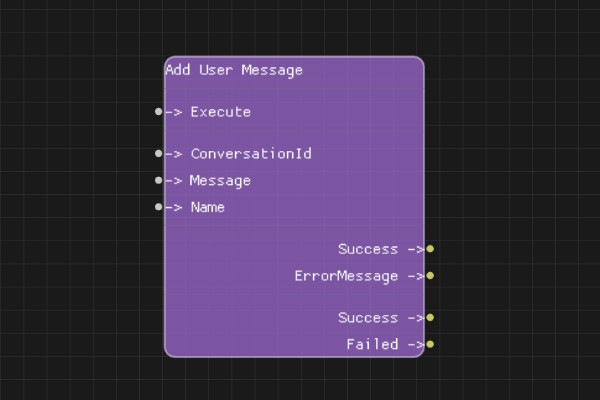
Description
The Add User Message node appends a user message to a conversation's message history. This message will be sent to the AI model when generating chat completions.
Execution Inputs
- Execute (execution): Triggers adding the message to the conversation
Variable Inputs
- ConversationId (string): The conversation ID from Create Conversation node
- Message (string): The user message content to add
- Name (string, optional): Optional name for the user
Execution Outputs
- Success (execution): Execution continues here if message was successfully added
- Failed (execution): Execution continues here if adding the message failed
Variable Outputs
- Success (boolean): "true" if message was successfully added, "false" otherwise
- ErrorMessage (string): Error message if operation failed
Special Notes
- The conversation must exist (created via Create Conversation node)
- Messages are appended to the conversation history in order
- Message content is validated and sanitized
- Maximum message size is 1MB
- The Name field is optional and used for multi-user scenarios
Example Usage
Add a user message to a conversation:
- Connect ConversationId from Create Conversation node
- Set Message to "What is the capital of France?"
- Connect Execute to add the message
- Connect Success output to Chat Completion node
Flow Download Example
Placeholder for flow download example
Additional Pictures
Placeholder for additional node images and examples