Create Chat Completion (Async) Node
The Create Chat Completion (Async) node initiates an asynchronous chat completion request. The response is handled in the background and can be retrieved later.
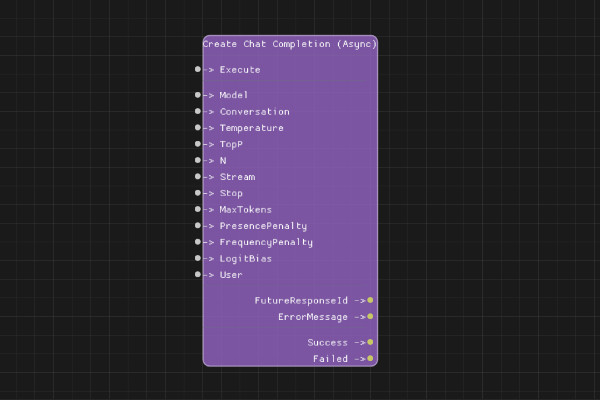
Description
The Create Chat Completion (Async) node starts an asynchronous chat completion request. Unlike the synchronous version, this node returns immediately with a future response ID that can be used to retrieve the result later.
This is useful for long-running requests that might take significant time to complete.
Execution Inputs
- Execute (execution): Triggers the async chat completion request
Variable Inputs
- Model (string): The model to use (e.g., "gpt-3.5-turbo", "gpt-4")
- Conversation (string): The conversation ID from Create Conversation node
- Temperature (float, optional): Sampling temperature between 0 and 2
- TopP (float, optional): Nucleus sampling parameter
- N (integer, optional): Number of completions to generate
- Stream (boolean, optional): Whether to stream the response
- Stop (string, optional): Stop sequences (comma-separated)
- MaxTokens (integer, optional): Maximum tokens to generate
- PresencePenalty (float, optional): Penalty for token presence (-2.0 to 2.0)
- FrequencyPenalty (float, optional): Penalty for token frequency (-2.0 to 2.0)
- LogitBias (string, optional): JSON object mapping token IDs to bias values
- User (string, optional): User identifier for tracking
Execution Outputs
- Success (execution): Execution continues here if the request was successfully initiated
- Failed (execution): Execution continues here if the request failed to start
Variable Outputs
- FutureResponseId (string): ID to use for retrieving the response later
- ErrorMessage (string): Error message if request failed
Special Notes
- The request is processed asynchronously in the background
- Use the FutureResponseId to retrieve the result when ready
- The response must be retrieved using appropriate async result retrieval mechanisms
- This node returns immediately without waiting for the API response
Example Usage
Start an async chat completion:
- Use Create Conversation node to get a conversation ID
- Use Add User Message node to add your message
- Connect Conversation output to this node's Conversation input
- Set Model to "gpt-4" (slower model)
- Connect Execute to start the async request
- Store FutureResponseId for later retrieval
Flow Download Example
Placeholder for flow download example
Additional Pictures
Placeholder for additional node images and examples