Set OpenAI Organization Node
The Set OpenAI Organization node configures the OpenAI organization ID for API requests. This is useful when you have access to multiple organizations.
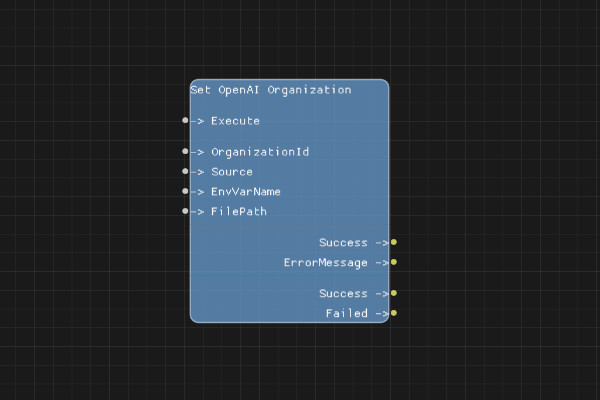
Description
The Set OpenAI Organization node sets the organization ID that will be used for OpenAI API requests. This is optional but required if your API key has access to multiple organizations.
The organization ID can be provided directly, from an environment variable, or from a file, similar to the API key configuration.
Execution Inputs
- Execute (execution): Triggers the organization ID configuration
Variable Inputs
- OrganizationId (string, optional): The organization ID value (required if Source is "direct")
- Source (string): The source of the organization ID. Must be one of: "direct", "env", or "file" (default: "direct")
- EnvVarName (string, optional): The name of the environment variable containing the organization ID (required if Source is "env")
- FilePath (string, optional): The path to the file containing the organization ID (required if Source is "file")
Execution Outputs
- Success (execution): Execution continues here if the organization ID was successfully configured
- Failed (execution): Execution continues here if configuration failed
Variable Outputs
- Success (boolean): "true" if the organization ID was successfully configured, "false" otherwise
- ErrorMessage (string): Error message if configuration failed, empty string otherwise
Special Notes
- The organization ID is stored in session state with the key "openai_organization_id"
- This node is optional - only use it if you need to specify a particular organization
- The Source field is case-sensitive and must be exactly "direct", "env", or "file"
- Organization ID validation ensures the ID is not empty and meets length requirements
Example Usage
Set the organization ID from an environment variable:
- Set Source to "env"
- Set EnvVarName to "OPENAI_ORG_ID"
- Connect Execute to start the flow
- Connect Success output to your OpenAI API nodes
Flow Download Example
Placeholder for flow download example
Additional Pictures
Placeholder for additional node images and examples