Create Image Edit Node
The Create Image Edit node edits an existing image based on a text prompt and optional mask image.
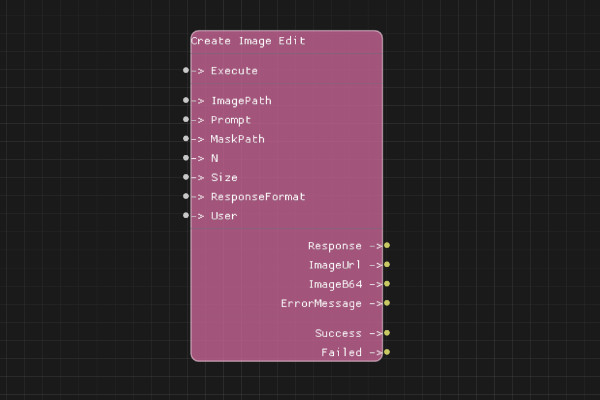
Description
The Create Image Edit node modifies an existing image using DALL-E's image editing capabilities. You provide the original image, a text prompt describing the edit, and optionally a mask image that defines which areas to edit.
Execution Inputs
- Execute (execution): Triggers the image edit request
Variable Inputs
- ImagePath (string): Path to the image file to edit (must be a valid PNG file)
- Prompt (string): Text description of the desired edit
- MaskPath (string, optional): Path to the mask image file (PNG). White areas are edited, black areas are preserved
- N (integer, optional): Number of edited images to generate (1-10, default: 1)
- Size (string, optional): Image size. Must be one of: "256x256", "512x512", "1024x1024" (default: same as input image)
- ResponseFormat (string, optional): Format of the response. Must be "url" or "b64_json" (default: "url")
- User (string, optional): User identifier for tracking
Execution Outputs
- Success (execution): Execution continues here if the request succeeded
- Failed (execution): Execution continues here if the request failed
Variable Outputs
- Response (string): Full JSON response from the API
- ImageUrl (string): URL of the edited image (if ResponseFormat is "url")
- ImageB64 (string): Base64-encoded image data (if ResponseFormat is "b64_json")
- ErrorMessage (string): Error message if request failed
Special Notes
- Requires a valid API key configured via Set API Key node
- Input image must be a PNG file
- Mask image (if provided) must be a PNG file with the same dimensions as the input image
- White areas in the mask are edited, black areas are preserved
- If no mask is provided, the entire image may be edited
- Image and mask files must be accessible from the system
Example Usage
Edit an image with a mask:
- Set ImagePath to "path/to/image.png"
- Set MaskPath to "path/to/mask.png" (white areas will be edited)
- Set Prompt to "Add a red hat to the person"
- Connect Execute to generate the edit
- Use ImageUrl output to get the edited image
Edit an image without a mask:
- Set ImagePath to "path/to/image.png"
- Leave MaskPath empty
- Set Prompt to "Make the background blue"
- Connect Execute to generate the edit
Flow Download Example
Placeholder for flow download example
Additional Pictures
Placeholder for additional node images and examples