List Files Node
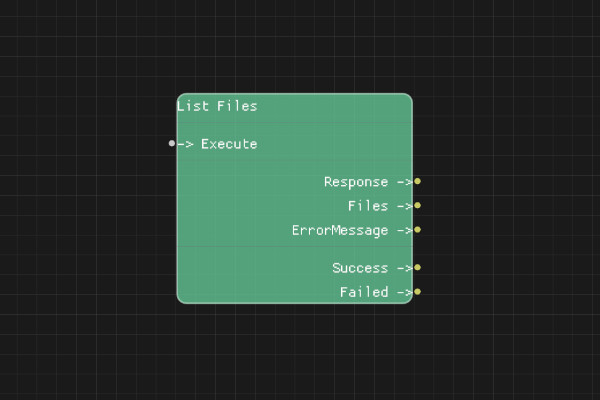
The List Files node retrieves a list of all files uploaded to your OpenAI account.
Description
The List Files node retrieves information about all files you have uploaded to OpenAI. This includes file IDs, names, sizes, purposes, and creation dates.
Execution Inputs
- Execute (execution): Triggers listing files
Variable Inputs
None
Execution Outputs
- Success (execution): Execution continues here if the request succeeded
- Failed (execution): Execution continues here if the request failed
Variable Outputs
- Response (string): Full JSON response from the API
- Files (string): JSON array of file information
- ErrorMessage (string): Error message if request failed
Special Notes
- Requires a valid API key configured via Set API Key node
- Files output is a JSON array that can be parsed
- Each file object contains: id, object, bytes, created_at, filename, purpose
- Use this to find FileIds for other operations
- Only files you have uploaded are listed
Example Usage
List all uploaded files:
- Connect Execute to list files
- Use Files output to get the list
- Parse the JSON array to access individual file information
- Use file IDs with other file operations
Flow Download Example
Placeholder for flow download example
Additional Pictures
Placeholder for additional node images and examples